


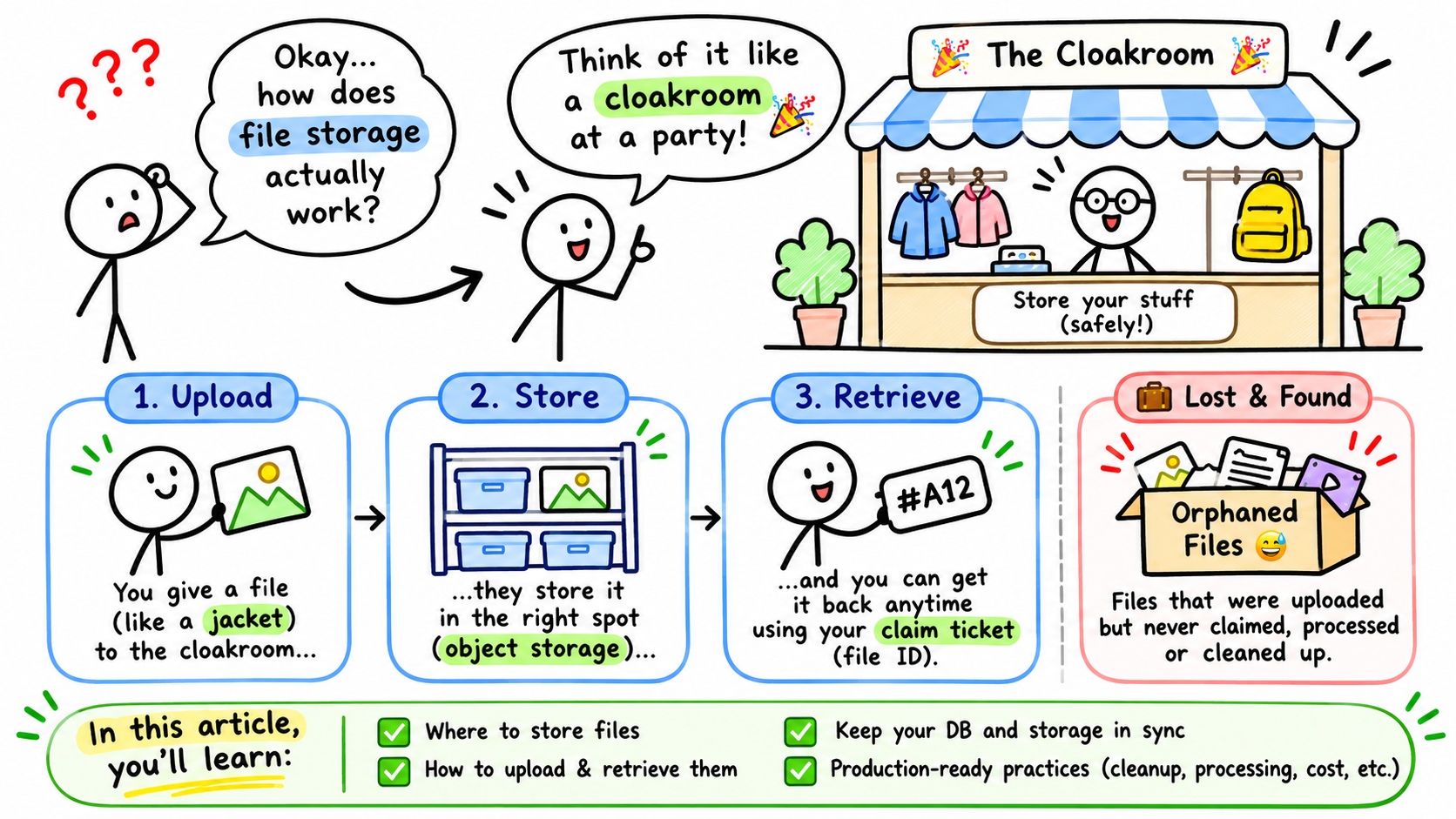
One of the most fundamental concepts of the web is sharing files over a network.
Everything you see on a web page is ultimately backed by data stored somewhere. Images, videos, documents, audio files, and even the HTML, CSS and JavaScript used to render the page, they're all fetched from somewhere.
Some of the most widely used infrastructure services from companies like AWS, Cloudflare, and even self-hosted alternatives like MinIO are built around one simple requirement: storing and serving files.
Today, we'll fix the simple surprisingly complex process of uploading a file to the internet.
But before we get into the implementation, let's understand what we're actually dealing with.
By the end of this article, you should be able to:
- Understand how files are represented and transferred over the internet.
- Decide whether a file belongs in your database, local file system or object storage.
- Understand the difference between storing a file and delivering it to a user, including the associated network costs.
- Implement file uploads and retrieval using different approaches, including pre-signed URLs, chunking and streaming.
- Make an informed decision between managed cloud storage and running your own infrastructure.
We'll use a typical SaaS application as our running example, where users can upload documents, profile pictures and videos.
Let's get started.
1. The life of a file over the internet
If you've never touched networking in college, let's do a quick refresher on some Computer Science.
What is a file 🤔?
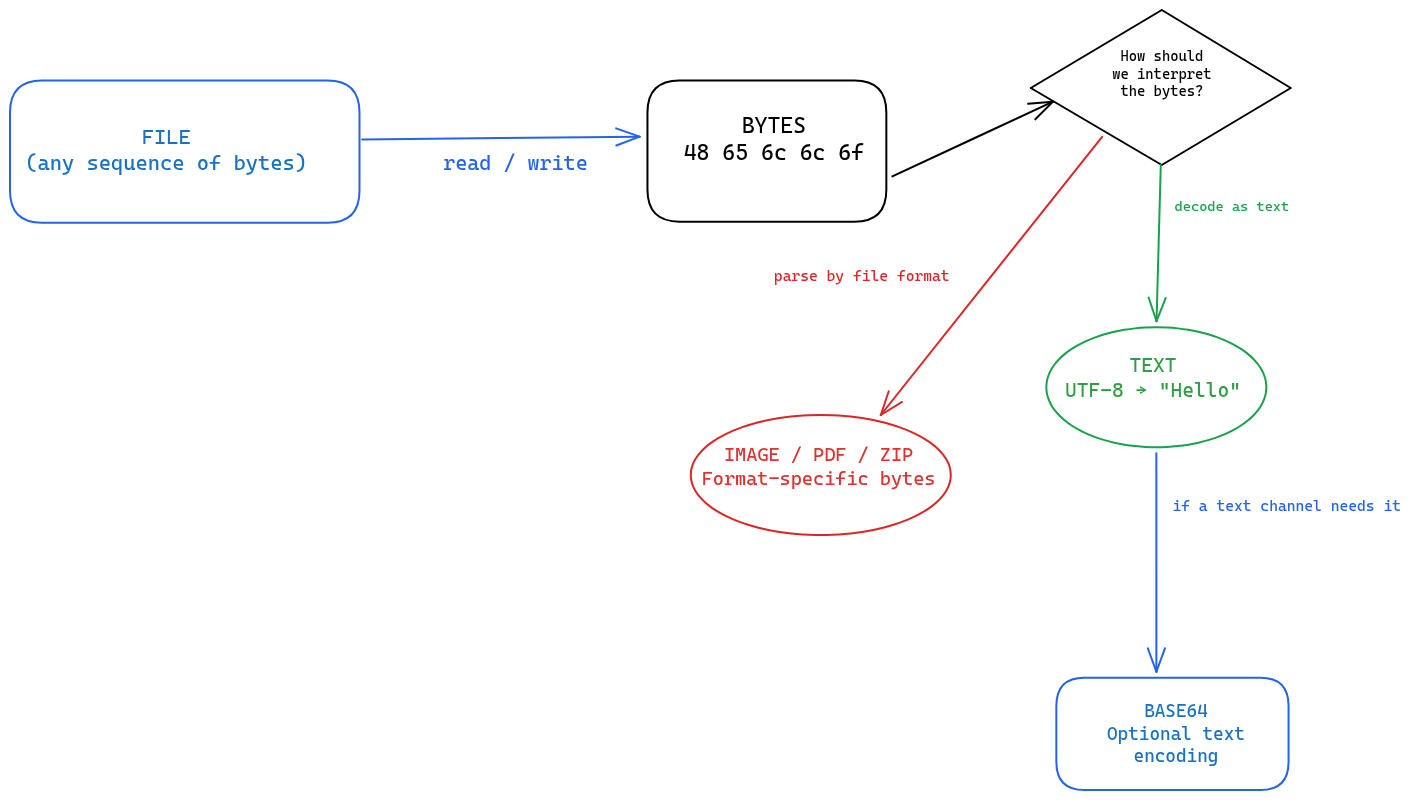
A file is essentially a collection of bytes stored somewhere and identified by a name.
Each byte is made up of 8 bits, and computers use these bytes to represent everything from plain text to images, videos and executable programs.
There are hundreds of file formats, but from the perspective of how a computer stores and transfers them, we can start with two broad categories:
- Text files 🔡: Files whose bytes are interpreted as characters using an encoding such as UTF-8. Examples include .txt, .json, .csv and .md.
- Binary files 👨💻: Files whose bytes follow a format-specific structure. Examples include .jpg, .png, .pdf, .zip and .mp4.
Now, here's an important distinction.
A text file is also stored as bytes. The only difference is how software interprets those bytes.
For example, consider a text file containing:
Hello
Its UTF-8 representation is:
48 65 6C 6C 6F
These are hexadecimal representations of the bytes that make up the word Hello.
An image is also just a sequence of bytes, but instead of interpreting those bytes as characters, an image decoder follows the JPEG or PNG format to reconstruct the image.
So, at the end of the day, both are just bytes. The format tells the software how to interpret them.
This is also why a file doesn't necessarily need to be converted into a string before it can be transferred or stored.
What is Base64?
You might have encountered Base64 when working with images in APIs, data URLs or while debugging some weird-looking API response.
Base64 is simply a way of representing arbitrary binary data using printable ASCII characters.
For example, the word Hello can be represented as:
Hello       → UTF-8 bytes
48 65 6C 6C 6F

SGVsbG8=    → Base64 representation
Why would we ever need this?
Some systems or formats are designed to handle text rather than arbitrary binary data. Base64 gives us a way to represent those bytes using characters that such systems can handle.
But there's a catch.
Base64 increases the size of the original data by roughly 33%.
So, converting every image or PDF to Base64 before uploading it is generally unnecessary when the underlying protocol already supports binary data.
You can read more about the encoding itself in MDN's explanation of Base64.
File extensions and MIME types
Another thing worth understanding is the difference between a file extension and a MIME type.
A file extension is simply a naming convention.
For example:
profile-picture.jpg
report.pdf
notes.md
The .jpg, .pdf and .md parts tell us what kind of file we are probably dealing with.
But they don't actually guarantee the contents of the file.
I can rename an executable file to vacation.jpg, but that doesn't magically turn it into an image. 😅
This is where MIME types come in.
A MIME type describes the nature and format of the data being transferred.
Some common examples are image/jpeg, image/png, application/pdf, text/plain, application/json, video/mp4
When a server sends a file over HTTP, it can specify its MIME type using the Content-Type header.
For example:
HTTP/1.1 200 OK
Content-Type: image/jpeg
Content-Length: 1048576

<file bytes>
This tells the browser that the response contains JPEG image data.
NOTE: a MIME type provided by the client during upload is not proof that the file actually contains that type of data. We'll revisit this when discussing file validation.
You can find a much more comprehensive explanation, along with a list of common MIME types, in MDN's guide to MIME types.
How do files travel over the internet ✈️?
Whenever your browser requests a web page, loads an image or submits a form, it communicates with a server using HTTP (or HTTPS).
A simplified HTTP request for a file upload looks something like this:
POST /api/files HTTP/1.1
Host: example.com
Content-Type: multipart/form-data; boundary=xyz

--xyz
Content-Disposition: form-data; name="file"; filename="report.pdf"
Content-Type: application/pdf

<actual file bytes>
--xyz--
There are two things worth paying attention to here:
- Headers: These carry metadata about the request, such as the content type, authentication information and other request properties.
- Body: This is where the actual data being sent lives.
Notice that the file is being sent as part of the request body. We aren't converting it to Base64 or doing anything fancy.
HTTP supports different ways of sending data. One of the most common ones for browser-based file uploads is multipart/form-data.
It allows us to send multiple fields in a single request, where each field can have its own content and headers.
For example, we can send a file along with some additional metadata:
file = report.pdf user_id = 123 category = invoices
In JavaScript, the browser's FormData API handles the multipart formatting for us:
const formData = new FormData();

formData.append("file", selectedFile);
formData.append("category", "invoices");

await fetch("/api/files", {
  method: "POST",
  body: formData
});
That's it.
The browser takes care of constructing the multipart request, including the boundary used to separate individual fields.
One small but important detail: don't manually set the Content-Type header when sending a FormData object using fetch. The browser needs to add the boundary parameter itself.
You can read more about this in MDN's FormData documentation.
What about FTP and SFTP?
HTTP isn't the only way to transfer files over a network.
There are a few other protocols worth knowing about:
- HTTP/HTTPS: Transfers data between clients and servers
- FTP/SFTP: Traditional file transfer protocols
Now, when should you use what?
Let's say you're building a regular web application where users upload profile pictures and documents.
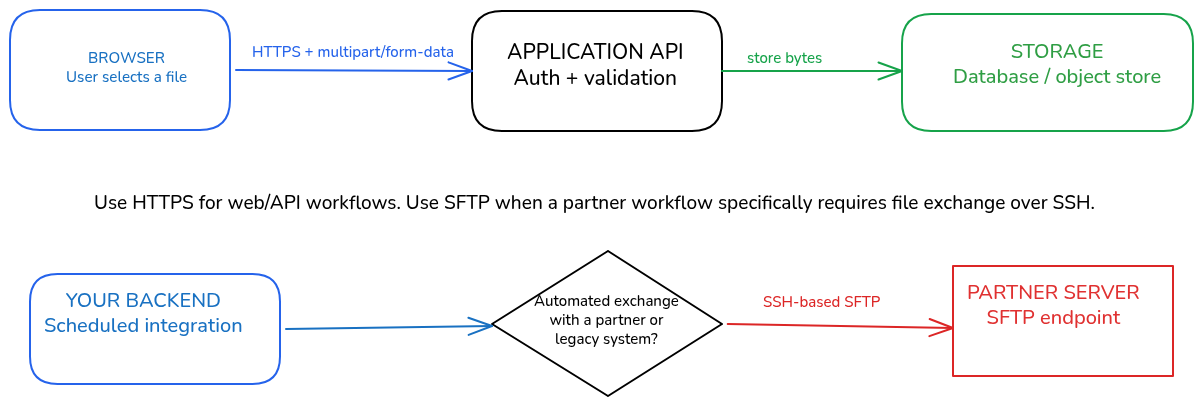
HTTP/HTTPS is the obvious choice. Your browser already understands it, your backend exposes HTTP APIs, and your storage provider probably exposes an HTTP-based API as well.
But imagine you're building an application that exchanges thousands of invoices with an external accounting company every night.
The other company might provide an SFTP endpoint where you can upload and download files using SSH authentication.
In that case, SFTP is a perfectly reasonable choice.
A simple rule of 👍:
- Building a browser-based application or communicating with an API? Use HTTPS.
- Exchanging files with an external system that exposes an SFTP endpoint? Use SFTP.
- Working with a legacy integration that specifically requires FTPS? Use FTPS.
- Considering plain FTP? Avoid it for sensitive data because it doesn't encrypt the transfer.
Also, SFTP isn't just FTP with a security layer added to it. It's a different protocol that operates over SSH.
You can look at the OpenSSH SFTP manual if you'd like to understand the actual tooling.
💡 One thing to remember: The size of a file doesn't automatically determine which transfer protocol you should use. HTTP and SFTP can both handle large files. Your integration requirements, authentication model and supported infrastructure should drive that decision.
A file's first journey
Let's put everything we've discussed together with a simple example.
Imagine we're building a SaaS application where users can upload profile pictures.
The journey looks something like this:
- A user selects an image from their computer.
- The browser reads the selected file using the File API.
- The browser sends the file to our backend using an HTTP request.
- The backend receives the file bytes and validates the request.
- The backend needs to store the file somewhere.
- Later, another user requests that image and our application needs to retrieve it.
We've solved the transfer part, but there's still one important question left.
Where exactly should our backend store these bytes?
Let's look at our options.
2. Where should you store your files 🗄️?
There are multiple ways of storing files, and each comes with its own trade-offs.
You can store them directly in your database, on the same machine running your application, or use a dedicated storage system like AWS S3.
Let's look at each option and, more importantly, understand when to pick what.
Storing files inside your database 💾
This is probably the first thing that comes to mind when you're building an application with a database.
Why not just create a column, insert the file and call it a day?
Well, you can. But there are a few things to understand first.
Most relational databases provide ways to store both text and binary data.
For example, PostgreSQL supports:
- TEXT for storing variable-length character data.
- BYTEA for storing binary data.
You can read more about PostgreSQL's binary data types here.
Apart from PostgreSQL, almost all SQL/NoSQL Databases support binary data types.
Let's say we're building an application where users can upload Markdown documents.
We could simply store the contents of the Markdown file in a TEXT column:
CREATE TABLE documents (
    id SERIAL PRIMARY KEY,
    user_id INTEGER NOT NULL,
    title TEXT NOT NULL,
    content TEXT NOT NULL,
    created_at TIMESTAMP DEFAULT NOW()
);
This is a perfectly reasonable design.
In fact, if your application needs to frequently read, update, search or version the contents of these documents, having them inside your database can make a lot of sense.
What about binary files?
We can use BYTEA to store the actual bytes:
CREATE TABLE attachments (
    id SERIAL PRIMARY KEY,
    filename TEXT NOT NULL,
    content BYTEA NOT NULL
);
Notice that we're storing raw binary data here, not a Base64-encoded string.
So, should we just store every file in the database?
Not necessarily.
The problem with storing files in your database isn't that databases cannot handle binary data. It's that they're usually optimized to solve a different problem.
As your application grows, storing large files directly in the database can introduce a few challenges:
- Database size increases considerably.
- Backups and restores become heavier.
- Replication has to deal with larger amounts of data.
- Large binary reads and writes can compete with your normal application queries.
- Serving files through your database can introduce unnecessary load on your primary application infrastructure.
This doesn't mean you should never store files in a database.
A small Markdown document that is part of your application's core data model is a very different problem from a 500 MB video uploaded by a user.
When should you choose database storage?
- When the file is actually application data that you need to query or modify.
- When it needs to participate in the same transaction as other database records.
- When you have relatively small binary files and a good reason to keep them alongside your application data.
- When your application benefits from database-level consistency and access control.
And here's an important distinction: a file extension or size alone shouldn't determine where it belongs.
A Markdown document can be stored in PostgreSQL as TEXT if it's part of your application's content model.
But if users are uploading Markdown files as independent attachments, object storage might be a better fit.
Storing files on your application server
Another straightforward approach is to store files directly on the machine running your application.
Most programming languages provide APIs to read and write files to the local filesystem.
In Node.js, for example:
import fs from "node:fs/promises";

await fs.writeFile(
  "./uploads/report.pdf",
  fileBuffer
);
This writes the file directly to the filesystem of the machine running your Node.js process.
Simple enough, right?
For a small application running on a single server, this can work perfectly fine.
But now imagine that your application starts receiving more traffic.
You decide to scale horizontally and run three application instances behind a load balancer.
             Load Balancer
                  |
          -------------------
          |        |        |
        App 1    App 2    App 3
          |        |        |
         Disk     Disk     Disk
Now consider this scenario:
- A user uploads a profile picture.
- The load balancer routes the request to App 1.
- App 1 stores the file in its local uploads directory.
- A subsequent request gets routed to App 2.
- App 2 tries to read the same file.
And... the file isn't there. 😐
That's because each application instance has its own filesystem.
You could introduce a shared filesystem or synchronize the files between machines, but now you're adding another piece of infrastructure to maintain.
There's also the issue of persistent vs ephemeral storage.
For example, when running applications inside containers, data written to the container's writable filesystem may disappear when the container is replaced.
You can solve this using persistent volumes, but that doesn't automatically solve the problem of sharing files between multiple instances.
When should you choose local filesystem storage?
- Small applications running on a single machine.
- Temporary files created during processing.
- Files that are generated and consumed by the same worker.
- Applications where the files don't need to survive the lifecycle of the application instance, or where persistence is explicitly managed.
For most applications that expect to scale horizontally, I'd avoid treating the local filesystem as the primary storage for user-uploaded files.
Object storage
Now we're getting to the most popular form of file storage used in modern apps.
Object storage is a storage model specifically designed to store and retrieve large amounts of unstructured data.
Instead of thinking in terms of files and directories, think of objects stored inside containers called buckets.
An object generally consists of:
- Key: The identifier used to locate the object.
- Value: The actual bytes of the file.
- Metadata: Additional information describing the object.
For example, we could have a bucket called user-uploads containing an object with this key:
users/123/profile-picture.jpg
The object key is what we use to identify and retrieve the file.
Notice that the key looks like a directory structure.
But object storage generally doesn't behave like a traditional filesystem. Those slash-separated names are object keys, not necessarily actual directories.
The reason object storage is so popular for modern applications is that it separates file storage from the application itself.
Your application doesn't need to worry about which physical machine holds the file or how many application instances are running.
It simply communicates with the storage service using its API.
Your application can upload, retrieve or delete objects without having to manage the underlying storage hardware.
You can also store additional metadata alongside objects, configure access policies, enable versioning and introduce lifecycle rules.
For example, AWS S3 provides all of these capabilities through its object storage APIs.
Its official object storage documentation is a good place to explore those features.
When should you choose object storage?
- User-uploaded images, PDFs and documents.
- Audio and video files.
- Large files that have an independent lifecycle from your application records.
- Applications running multiple instances.
- Applications that need to serve files independently of their application servers.
For a typical SaaS application, this is generally where I'd start.
Keep your application data and file metadata in the database, and store the actual file bytes in object storage.
For example:
PostgreSQL
--------------------------------
id: 123
filename: profile-picture.jpg
object_key: users/123/profile-picture.jpg
content_type: image/jpeg
size: 1048576
Object Storage
--------------------------------
Bucket: user-uploads
Key: users/123/profile-picture.jpg
Value: <actual image bytes>This way, the database knows about the file, but it doesn't have to store the file itself.
Pretty neat, right?
It's only con is that you have to have good systems in place to keep your remote bucket in sync with your Database so you don't run into orphan assets or inconsistent DB records.
What about NAS, block storage and other systems?
There are a few more storage technologies worth knowing about, but we don't need to get into their internals here.
NAS (Network Attached Storage)
A NAS is essentially a machine that provides shared storage over a network.
It's useful when multiple machines need access to the same files through a shared filesystem.
You might encounter it in self-hosted environments or applications that already depend on shared network storage.
Block storage
Think of this as a virtual disk that you attach to a server.
Cloud providers offer block storage services that behave much like disks attached to physical machines.
For example, AWS EBS is commonly used to provide persistent block storage to EC2 instances.
You generally use this underneath databases, application servers or filesystems rather than as a direct replacement for an object storage API.
Distributed filesystems
These provide a shared filesystem interface across multiple machines.
They're useful for specialized workloads where applications require filesystem semantics but the underlying storage needs to span multiple nodes.
The important thing is that these technologies exist, and each solves a slightly different problem.
For most of the applications, we generally don't use these.
OK, So fare we've looked at the different places our files can live, and we have a reasonable idea of what to choose for different application requirements.
But storing a file is only half the problem.
What happens when somebody wants to download it? And more importantly, who pays for moving those bytes across the network?
Let's talk about that next.
3. Retrieving files isn't free
So far, we've discussed where to store files. But there's another part of the equation that developers often overlook: retrieving and delivering those files.
Storing a 100 GB video library is one thing. Serving those videos to 10,000 users every day is an entirely different problem.
Let's understand why.
How does an application retrieve a file?
The retrieval process depends on where we've stored the file.
If we're storing a document in PostgreSQL, our application queries the database and receives the contents of the corresponding TEXT or BYTEA column.
If we're using a local filesystem, the application reads the file from its path.
And if we're using object storage, the application makes a GET request to the storage provider using the bucket and object key.
Let's take our SaaS application example again and take the case where our database stores the metadata of the file, while object storage holds its actual bytes.
That means a retrieval request generally involves both systems.
Imagine a user requests an invoice.
Our application first needs to:
- Identify the file the user is requesting.
- Fetch its database record.
- Verify that the user is authorized to access it.
- Check whether the file is in a state that allows retrieval.
- Retrieve the actual bytes from storage or generate a URL that allows the user to retrieve them.
Notice that we're not blindly requesting an object from S3 using whatever key the browser sends us.
The database tells us which object belongs to the requested file, who owns it and whether it's available.
Imagine a user wants to download an invoice.
We have two ways of handling this.
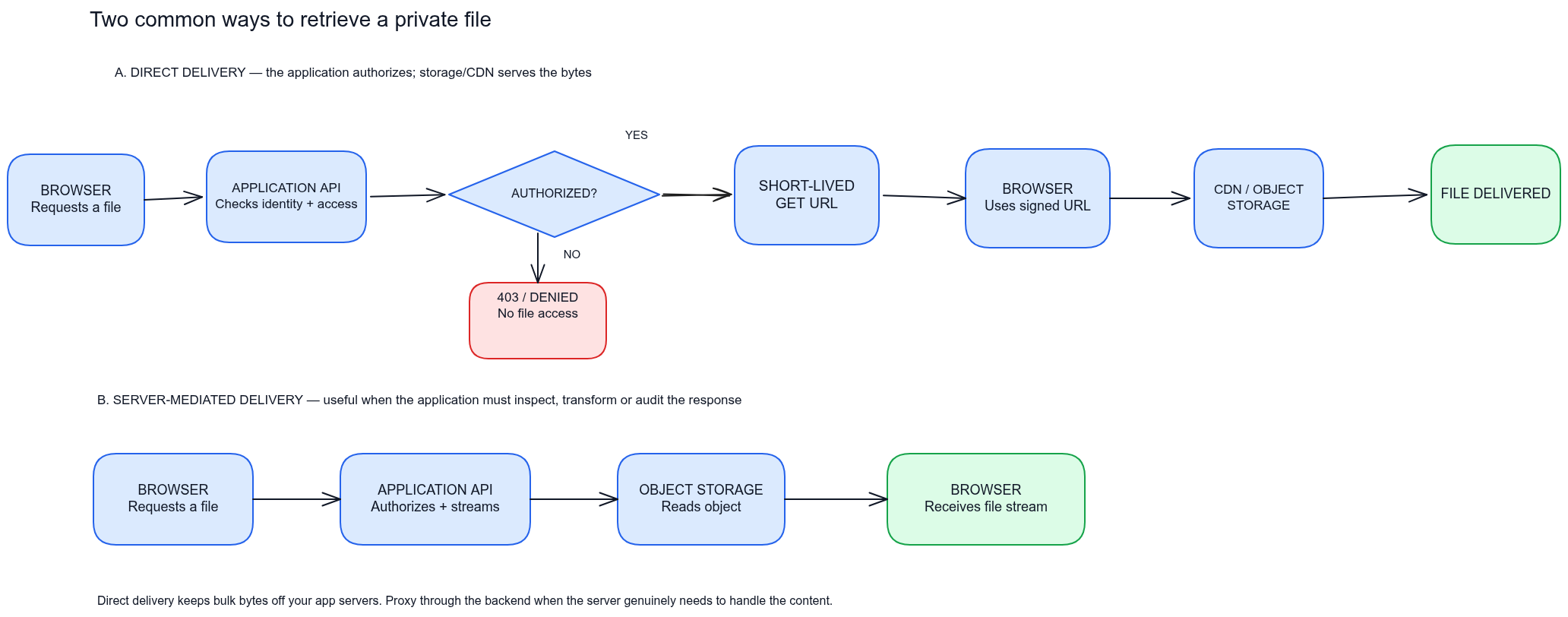
1. Server-mediated retrieval 🚦✋
The browser requests the invoice from our backend.
Our backend checks whether the user is authorized to access it, fetches the file from object storage and returns it to the browser.
Browser
   |
   v
Backend API
   |
   +------> PostgreSQL
   |        Verify ownership
   |        Check file status
   |
   +------> Object Storage
   |        Fetch object
   |
   v
Browser receives file
The application server handles the entire transfer.
This gives us greater control over the response. We can transform the file, add watermarks, audit the download or perform additional checks before returning it.
But there's a downside.
Every byte downloaded by the user also passes through our application infrastructure.
Imagine 1,000 users downloading a 100 MB file.
That's approximately 100 GB of data that our backend has to handle, in addition to its normal API traffic.
2. Direct retrieval 📩 using a pre-signed URL
Another option is to let the backend authorize the request and generate a temporary URL that allows the browser to retrieve the file directly.
Browser → Backend (request file)
                 |
                 v
             PostgreSQL
           Check ownership
           Check file status
                 |
                 v
             Backend
                 |
          Generate signed URL
                 |
                 v
Browser ← Pre-signed URL
   |
   v
Object Storage
   |
   v
Browser receives file
Here, the backend is responsible for access control, but the actual transfer happens between the browser and object storage.
This is particularly useful when dealing with large files or applications serving a lot of user-generated content.
When should you choose what?
- Server-mediated retrieval: When the application needs to inspect, modify, transform or audit the file before delivering it.
- Direct retrieval: When the file can be served as-is and you want to keep bulk data transfer away from your application servers.
One thing worth remembering: direct retrieval doesn't mean public retrieval. We can keep our bucket private and authorize each download using a pre-signed URL.
Understanding the cost 💰 of retrieval
Now comes the interesting part.
Cloud storage providers generally don't charge you for just one thing. Depending on the provider and storage class, your bill can contain several components:
- Storage: How much data you're storing and for how long.
- Requests: PUT, GET, LIST and other API operations.
- Data retrieval: Some infrequent-access and archive storage classes charge additional retrieval fees.
- Data transfer: The amount of data leaving the provider's network.
- Additional services: CDN delivery, replication, processing and other infrastructure.
The last two deserve particular attention.
Let's say we have an application with:
- 100 GB of stored user files.
- 10,000 active users.
- Each user downloads an average of 100 MB every month.
Our monthly data transfer would be:
10,000 users × 100 MB = 1,000,000 MB ≈ 1,000 GB ≈ 1 TB
Notice something?
We're storing 100 GB but delivering approximately 1 TB every month.
That's 10 times the amount of data we're storing.
And this isn't even an unusually large application.
The actual bill will depend on the provider, region, storage class, request volume and any free allowances or negotiated discounts.
For example, AWS S3 separates storage, request, retrieval and data-transfer pricing. Cloudflare R2 currently advertises no internet-egress charge, although storage, operations and certain retrieval charges still apply.
You can check their pricing models here:
I'm not going to hardcode pricing into this article because it changes frequently. Always calculate using your expected upload volume, stored data, downloads and request patterns.
What is a CDN and when do you need one 🤷?
Let's introduce one more piece of infrastructure that can significantly improve file delivery: a Content Delivery Network (CDN).
A CDN is a network of geographically distributed servers that cache and deliver content closer to the user requesting it.
Imagine our application stores profile pictures in an object storage bucket located in the US.
A user sitting in India requests one of these images.
Without a CDN, the request might travel all the way to our storage origin in the US every time.
With a CDN, the journey looks a little different.
The first time the image is requested, the CDN's edge server might not have it cached.
This is called a cache miss.
The CDN fetches the image from the origin, returns it to the user and, when the caching rules allow, stores a copy at the edge.
The next time another user requests the same image from that edge location, the CDN can serve it directly.
This is called a cache hit.
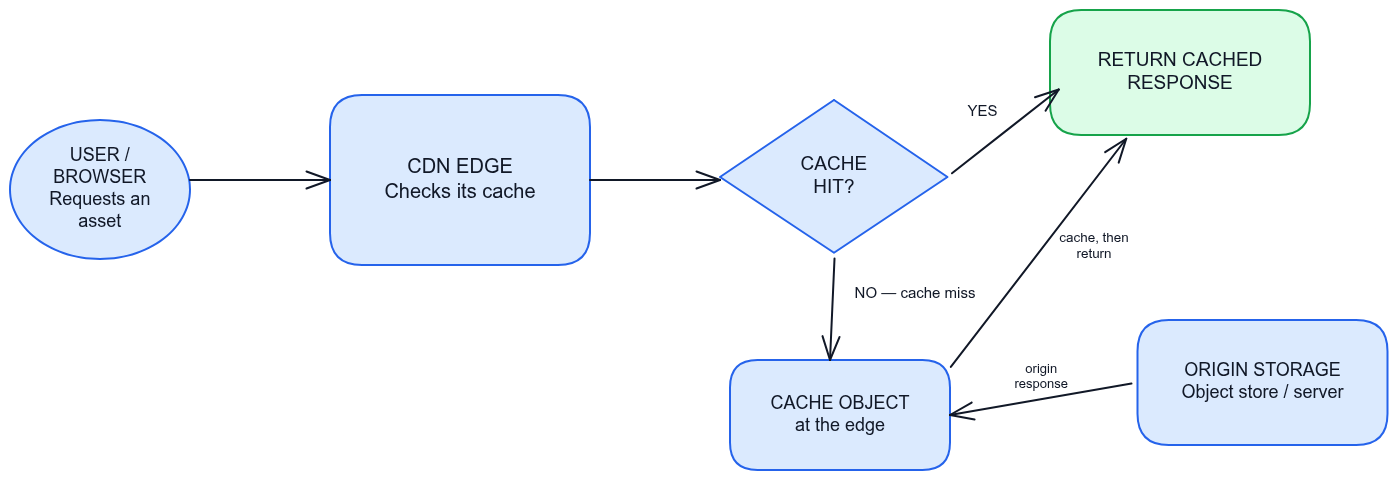
This helps reduce repeated requests to our origin storage and can improve latency for users located far away from it.
CDNs are particularly useful for:
- Profile pictures and other static assets.
- Publicly accessible documents.
- Images and videos.
- Files that are requested repeatedly by multiple users.
But there's one catch.
You need to configure caching correctly.
For example, you don't want a CDN accidentally serving one user's private invoice to another user just because both requests point to the same URL.
For private content, use appropriate authorization mechanisms such as signed URLs or signed cookies, and make sure the CDN's cache policy respects the privacy requirements of the content.
Also, a CDN doesn't magically make bandwidth free. You're still paying for delivery according to your provider's pricing model, even though you might be reducing requests to the original storage.
When should you introduce a CDN?
- Low traffic and mostly private files? Direct object storage delivery might be enough.
- Frequently accessed public assets? A CDN is worth considering.
- Large media libraries with users distributed geographically? A CDN can become an important part of the architecture.
- Private user-specific documents? Use proper access controls before optimizing cache hits.
4. Implementing file upload and retrieval
We've covered quite a bit so far.
We know what files are, how they're transferred, where to store them and what happens when users retrieve them.
Now let's put everything together.
For this section, we'll use:
- PostgreSQL for file metadata and application-level state.
- Prisma ORM for our TypeScript implementation.
- GORM for our Go implementation.
- S3-compatible object storage for the actual file bytes.
The tech decisions are based on my domain expertise and you can find similar design implementations across most language and frameworks.
Also, there's one architectural principle I want you to keep in mind throughout this section:
The database and object storage are two independent systems. We cannot wrap operations on both inside one ordinary database transaction.
This means we have to explicitly design for failures, retries and reconciliation.
Designing the file lifecycle 🔁
Before writing any upload code, let's decide what information our application needs to track.
We don't want a database record to simply say that a file exists.
We want it to tell us exactly where that file is in its lifecycle.
Let's introduce a File model with the following fields:
- id: Unique identifier for the file.
- ownerId: User who owns the file.
- originalName: Original filename provided by the user.
- bucket: Object storage bucket.
- objectKey: Unique key used to identify the object.
- contentType: Expected MIME type.
- sizeBytes: Actual size of the uploaded file.
- checksum: Optional checksum used to verify file integrity.
- status: Current state of the file.
- createdAt: When the upload was initiated.
- updatedAt: Last time the record was updated.
- deletedAt: When the file was marked for deletion.
For the status, we'll use the following lifecycle states:
- PENDING_UPLOAD: The database record exists, but the object hasn't been verified in storage.
- UPLOADED: The object exists in storage and has passed our initial upload verification.
- PROCESSING: The file is being scanned, converted or otherwise processed.
- READY: The file is available for retrieval.
- DELETE_PENDING: The file has been marked for deletion, but the object might still exist.
- DELETED: The object has been deleted and the database reflects that.
- FAILED: The upload or processing operation failed and needs investigation, retry or cleanup.
Notice that we're not marking a file as READY immediately after generating a pre-signed URL.
Generating an upload URL only means that we've authorized an upload. It doesn't mean the user actually uploaded anything.
This distinction is extremely important.
Modelling files using Prisma
Let's start with our JavaScript application.
We'll use Prisma ORM to define the file model.
enum FileStatus {
  PENDING_UPLOAD
  UPLOADED
  PROCESSING
  READY
  DELETE_PENDING
  DELETED
  FAILED
}

model File {
  id           String     @id @default(uuid())
  ownerId      String
  originalName String
  bucket       String
  objectKey    String     @unique
  contentType  String
  sizeBytes    BigInt?
  checksum     String?
  status       FileStatus @default(PENDING_UPLOAD)

  createdAt    DateTime   @default(now())
  updatedAt    DateTime   @updatedAt
  deletedAt    DateTime?

  @@index([ownerId, status])
  @@index([status, createdAt])
}
A few things worth pointing out:
- objectKey is unique because we don't want two database records accidentally pointing to the same object.
- sizeBytes is nullable because we don't know the actual uploaded size when the upload is first initiated.
- status allows us to track the file lifecycle.
- The indexes help us find files belonging to a user and identify files that have been stuck in a particular state.
In a real application, ownerId would generally be a relation to your existing User model, with a foreign key and an appropriate deletion policy.
We should also have a separate OutboxEvent model for reliable background processing, which we'll introduce shortly.
Modelling files using GORM
For our Go application, we'll use GORM.
GORM is one of the most widely adopted ORM libraries in the Go ecosystem. It supports struct-based models, associations, transactions, hooks and migrations.
Here's how our model looks:
type FileStatus string

const (
    FilePendingUpload FileStatus = "PENDING_UPLOAD"
    FileUploaded      FileStatus = "UPLOADED"
    FileProcessing    FileStatus = "PROCESSING"
    FileReady         FileStatus = "READY"
    FileDeletePending FileStatus = "DELETE_PENDING"
    FileDeleted       FileStatus = "DELETED"
    FileFailed        FileStatus = "FAILED"
)

type File struct {
    ID           string     `gorm:"type:uuid;primaryKey"`
    OwnerID      string     `gorm:"type:uuid;not null;index"`
    OriginalName string     `gorm:"not null"`
    Bucket       string     `gorm:"not null"`
    ObjectKey    string     `gorm:"not null;uniqueIndex"`
    ContentType  string     `gorm:"not null"`
    SizeBytes    *int64
    Checksum     *string
    Status       FileStatus `gorm:"type:varchar(30);not null;index"`

    CreatedAt    time.Time
    UpdatedAt    time.Time
    DeletedAt    gorm.DeletedAt `gorm:"index"`
}
We're keeping the same fields and life cycle in both implementations.
This is important because the ORM is only an abstraction over our database. The underlying data model and the consistency requirements don't change just because we're using Go instead of TypeScript.
The upload process: database first, storage second
Let's walk through an actual upload.
Imagine a user wants to upload invoice.pdf.
The browser first calls our backend to request an upload URL.
Before generating that URL, the backend should:
- Authenticate the user.
- Validate the requested filename, content type and expected file size.
- Generate a unique object key.
- Create a database record with PENDING_UPLOAD.
- Generate a pre-signed PUT URL.
- Return the file ID, upload URL and required headers to the browser.
Notice the order.
We're creating the database record before the actual file is uploaded.
Why?
Because we want to know that an upload was initiated, even if the user closes their browser halfway through.
If we only create the database record after the upload, we have no reliable record of uploads that were started but never completed.
Our object key should also be generated by the backend rather than accepting an arbitrary storage path from the client.
For example:
users/456/files/550e8400-e29b-41d4-a716-446655440000We can keep the original filename in PostgreSQL while using a unique, server-generated object key in storage.
This avoids filename collisions and prevents users from choosing paths that could overwrite other objects.
Let's implement the first part using Prisma.
import { randomUUID } from "node:crypto";
import { PrismaClient, FileStatus } from "@prisma/client";

const prisma = new PrismaClient();

async function initiateUpload(
  userId: string,
  originalName: string,
  contentType: string
) {
  const allowedTypes = new Set([
    "image/jpeg",
    "image/png",
    "application/pdf"
  ]);

  if (!allowedTypes.has(contentType)) {
    throw new Error("Unsupported file type");
  }

  const fileId = randomUUID();

  const objectKey =
    `users/${userId}/files/${fileId}`;

  const file = await prisma.file.create({
    data: {
      id: fileId,
      ownerId: userId,
      originalName,
      bucket: "user-uploads",
      objectKey,
      contentType,
      status: FileStatus.PENDING_UPLOAD
    }
  });

  const command = new PutObjectCommand({
    Bucket: file.bucket,
    Key: file.objectKey,
    ContentType: file.contentType
  });

  const uploadUrl = await getSignedUrl(
    s3,
    command,
    { expiresIn: 300 }
  );

  return {
    fileId: file.id,
    uploadUrl,
    method: "PUT",
    headers: {
      "Content-Type": file.contentType
    }
  };
}
For Go, the same operation can be implemented using GORM:
func initiateUpload(
    db *gorm.DB,
    userID string,
    originalName string,
    contentType string,
) (*File, error) {

    fileID := uuid.NewString()

    objectKey := fmt.Sprintf(
        "users/%s/files/%s",
        userID,
        fileID,
    )

    file := File{
        ID:           fileID,
        OwnerID:      userID,
        OriginalName: originalName,
        Bucket:       "user-uploads",
        ObjectKey:    objectKey,
        ContentType:  contentType,
        Status:       FilePendingUpload,
    }

    if err := db.Create(&file).Error; err != nil {
        return nil, err
    }

    return &file, nil
}
The function creates the database record. The S3 pre-signed URL is generated separately using the AWS SDK for Go.
One thing to notice: we're not opening a database transaction around the S3 request.
There's no reason to keep a database transaction open while waiting for an external service. The database record has already been committed.
If URL generation fails, we can mark the upload as failed or allow the pending record to expire and be cleaned up later.
The browser uploads the file
Once the backend returns the pre-signed URL, the browser can upload the file directly.
const response = await fetch(uploadUrl, {
  method: "PUT",
  headers: {
    "Content-Type": file.type
  },
  body: file
});

if (!response.ok) {
  throw new Error("Upload failed");
}
At this point, the object might exist in storage, but our database still says PENDING_UPLOAD.
And that's intentional.
The browser is not responsible for deciding whether our application considers the file ready.
Instead, it should notify our backend that the upload has completed.
Verifying the upload and updating the database
After the browser finishes uploading, it calls a completion endpoint:
POST /api/files/{fileId}/completeOur backend now needs to verify that the object actually exists.
For S3, we can use HeadObject.
This retrieves object metadata without downloading the actual file bytes.
We can verify:
- Whether the object exists.
- Its actual size.
- Its content type.
- Its checksum, if configured and available.
We should never blindly trust the size or content type sent by the browser.
For example, the client might claim that it uploaded a 1 MB PDF, while the actual object is 500 MB or contains something entirely different.
After verifying the object, we update the database.
But there's another important detail.
What if the object upload succeeds and the HeadObject request succeeds, but our database update fails?
The object exists, but the database still says PENDING_UPLOAD.
This is one of the reasons we introduced explicit lifecycle states.
We can retry the verification and update operation without asking the user to upload the file again.
For example, using Prisma:
const file = await prisma.file.findFirst({
  where: {
    id: fileId,
    ownerId: userId,
    status: FileStatus.PENDING_UPLOAD
  }
});

if (!file) {
  throw new Error("Invalid upload");
}

// Verify object existence and metadata using HeadObject.
const head = await s3.send(
  new HeadObjectCommand({
    Bucket: file.bucket,
    Key: file.objectKey
  })
);

if (head.ContentLength == null) {
  throw new Error("Unable to verify file size");
}

await prisma.file.updateMany({
  where: {
    id: file.id,
    ownerId: userId,
    status: FileStatus.PENDING_UPLOAD
  },
  data: {
    sizeBytes: BigInt(head.ContentLength),
    status: FileStatus.UPLOADED
  }
});
This is a simplified verification step. In production, we should also compare the expected size, enforce size limits, validate the actual content and verify the checksum when available.
Also, notice that we're using updateMany with the expected current status.
This is a conditional state transition. If another request has already changed the record, we don't blindly overwrite its new state.
For a production implementation, check that exactly one row was updated and handle duplicate completion requests idempotently.
Processing files before making them available
An uploaded file isn't necessarily ready to be served.
Depending on our application, we might need to:
- Scan it for malware.
- Validate its actual file signature.
- Generate image thumbnails.
- Extract PDF text.
- Transcode a video.
- Generate HLS playlists and video segments.
We don't want the browser waiting for all these operations to finish inside the upload request.
Instead, we can publish a background job after the upload has been verified.
The worker processes the file and eventually changes its state to READY.
Only files in the READY state should be available for normal retrieval.
If processing fails, the worker can retry or mark the file as FAILED, depending on the error.
And this brings us to another important production concern.
Keeping the database and object storage in sync
Remember when I said that our database and object storage don't share a transaction?
Let's look at what that actually means.
Imagine we perform these two operations:
- Upload file to S3
- Insert file metadata into PostgreSQL
What happens if the upload succeeds but the database insert fails?
We have an object in S3 that our application doesn't know about.
Now reverse the order:
- Insert file metadata into PostgreSQL
- Upload file to S3
What happens if the database insert succeeds but the upload fails?
We have a database record pointing to an object that doesn't exist.
Both are valid failure scenarios.
This is commonly known as a dual-write problem: one business operation requires writing to two independent systems, but we don't have a single atomic transaction covering both.
You can read more about the Transactional Outbox pattern, which addresses a related reliability problem.
Using the Transactional Outbox pattern
One way to make our workflow more reliable is to introduce an outbox table.
Instead of updating the database and publishing a background job as two independent operations, we create both records inside the same database transaction.
For example, after verifying the uploaded object, we want to:
- Change the file status to UPLOADED.
- Create an event asking a worker to process the file.
Both operations happen in one PostgreSQL transaction.
Here's the Prisma example:
await prisma.$transaction(async (tx) => {
  await tx.file.update({
    where: {
      id: fileId
    },
    data: {
      status: FileStatus.UPLOADED,
      sizeBytes: BigInt(actualSize)
    }
  });

  await tx.outboxEvent.create({
    data: {
      type: "FILE_UPLOADED",
      aggregateId: fileId,
      payload: {
        fileId
      }
    }
  });
});
Our OutboxEvent model might contain:
- id: Unique event ID.
- type: Event type, such as FILE_UPLOADED.
- aggregateId: ID of the file associated with the event.
- payload: Event data.
- createdAt: Event creation timestamp.
- processedAt: When the event was successfully handled.
- attempts: Number of processing attempts.
A separate worker continuously polls for unprocessed events, publishes them to our job queue and marks them as processed.
For GORM, the same transaction looks like this:
err := db.Transaction(func(tx *gorm.DB) error {
    if err := tx.Model(&File{}).
        Where(
            "id = ? AND status = ?",
            fileID,
            FilePendingUpload,
        ).
        Updates(map[string]interface{}{
            "status":     FileUploaded,
            "size_bytes": actualSize,
        }).Error; err != nil {
        return err
    }

    event := OutboxEvent{
        ID:          uuid.NewString(),
        Type:        "FILE_UPLOADED",
        AggregateID: fileID,
        Payload:     payload,
    }

    if err := tx.Create(&event).Error; err != nil {
        return err
    }

    return nil
})
If either database operation fails, the entire transaction rolls back.
Now our worker can safely pick up the event later.
One important thing: the worker should be idempotent.
This means that processing the same event twice shouldn't corrupt the file or create duplicate processing jobs.
Also, don't assume that marking an event as processed and publishing it to a message broker are automatically atomic. A worker can crash after publishing but before updating the outbox row.
That's why we generally design this pattern around at-least-once delivery, with idempotent consumers.
The outbox solves reliable communication between our database and background processing system. It doesn't magically make PostgreSQL and S3 one transactional system.
For our file upload workflow, we still need retries and reconciliation for failures involving object storage.
Retrieving files using the database as the source of truth
Now that we've built the upload life cycle, retrieval becomes much simpler.
The browser shouldn't send an arbitrary object key and expect the backend to return whatever it points to.
Instead, the browser requests a file using its database ID.
For example:
GET /api/files/550e8400-e29b-41d4-a716-446655440000/downloadOur backend:
- Finds the file record using its ID.
- Checks that the authenticated user has permission to access it.
- Checks that the file status is READY.
- Retrieves the bucket and object key from the database.
- Generates a pre-signed GET URL.
- Returns the URL to the browser.
The Prisma implementation is straightforward:
async function createDownloadUrl(
  fileId: string,
  userId: string
) {
  const file = await prisma.file.findFirst({
    where: {
      id: fileId,
      ownerId: userId,
      status: FileStatus.READY
    }
  });

  if (!file) {
    throw new Error("File not found");
  }

  const command = new GetObjectCommand({
    Bucket: file.bucket,
    Key: file.objectKey
  });

  return getSignedUrl(
    s3,
    command,
    { expiresIn: 300 }
  );
}
Notice that we're not accepting the object key from the client.
The database provides the actual storage location, and the application enforces ownership and file availability before generating the URL.
For files shared with other users, replace the simple ownerId check with your application's actual authorization rules.
For example, a document might be accessible to users belonging to the same organization, even if they weren't the ones who uploaded it.
When should you retrieve using a database record?
Pretty much whenever you're building an application where files belong to users, organizations, projects or other application entities.
The database should determine whether the file is accessible. Object storage should only be responsible for returning its bytes.
Deleting files without leaving orphaned assets
Now comes the part that is surprisingly easy to get wrong.
Deleting a file is not just a matter of calling DeleteObject and removing a database row.
Remember, we have two independent systems.
Imagine we do this:
- Delete file record from PostgreSQL
- Delete object from S3
If the S3 request fails, we've lost the database record but the object is still consuming storage.
We've created an orphaned asset.
What if we reverse the order?
- Delete object from S3
- Delete file record from PostgreSQL
If the database operation fails, we have a database record pointing to an object that no longer exists.
Neither approach is ideal.
Instead, we'll use a deletion lifecycle.
Step 1: Mark the file for deletion
First, update the database record:
await prisma.file.updateMany({
  where: {
    id: fileId,
    ownerId: userId,
    status: FileStatus.READY
  },
  data: {
    status: FileStatus.DELETE_PENDING,
    deletedAt: new Date()
  }
});
The file is now unavailable for normal retrieval, but its database record still exists.
Step 2: Create a deletion event
In the same database transaction, create an outbox event:
await prisma.$transaction(async (tx) => {
  const result = await tx.file.updateMany({
    where: {
      id: fileId,
      ownerId: userId,
      status: FileStatus.READY
    },
    data: {
      status: FileStatus.DELETE_PENDING,
      deletedAt: new Date()
    }
  });

  if (result.count !== 1) {
    throw new Error("File cannot be deleted");
  }

  await tx.outboxEvent.create({
    data: {
      type: "FILE_DELETE_REQUESTED",
      aggregateId: fileId,
      payload: { fileId }
    }
  });
});
Now we have a durable record of the deletion request.
Step 3: Let a background worker delete the object
The worker consumes the event, retrieves the file's object key and calls the storage provider's delete API.
If the deletion succeeds, it updates the database status to DELETED.
If the S3 request fails, the worker retries the operation.
Deleting the same object again is generally safe for this workflow, which makes retries much easier.
Step 4: Retain or eventually purge the database record
We don't necessarily need to physically delete the database record immediately.
Keeping a tombstone or soft-deleted record helps with:
- Audit trails.
- Retry operations.
- Troubleshooting.
- Understanding who deleted a file and when.
- Preventing accidental reuse of identifiers.
We can permanently purge old metadata records later, according to our retention policy.
For Go, the deletion request follows the same pattern using db.Transaction, updating the file state and inserting an OutboxEvent in one transaction. The worker can then use the AWS SDK to delete the object and update the record.
What happens to orphaned files?
Even with a well-designed upload and deletion workflow, failures can still leave our database and object storage out of sync.
For example:
- A user uploads a file but closes the browser before calling the completion endpoint.
- An upload succeeds but the database update fails.
- A worker crashes after deleting an object but before updating the database.
- A deployment interrupts a processing job.
- An administrator manually deletes an object from the storage console.
We need a reconciliation process to catch these situations.
I'd introduce two periodic background jobs.
1. Database-to-storage reconciliation
Find database records that have been stuck in states such as:
- PENDING_UPLOAD for too long.
- UPLOADED without progressing to processing.
- DELETE_PENDING without completing deletion.
- PROCESSING beyond the expected processing time.
For each record, inspect the corresponding object and decide what should happen.
For example, if a PENDING_UPLOAD record is several hours old and the object exists, we can verify it and resume processing.
If the object doesn't exist and the upload has expired, we can mark the record as FAILED or clean it up according to our policy.
2. Storage-to-database reconciliation
We should also periodically identify objects that exist in storage but have no corresponding database record.
This is the other direction of the consistency problem.
For a small bucket, we can enumerate objects and compare their keys against database records.
For large buckets, avoid running an expensive full scan on every reconciliation cycle. Use object inventory reports, scoped prefixes, age filters or storage events to make the process more efficient.
Don't immediately delete every object that doesn't have a matching database record.
A newly uploaded object might be between the storage upload and database completion steps.
Instead, use an age threshold, quarantine suspicious objects if appropriate, and only delete them after confirming that they're genuinely orphaned.
One more thing: Configure an object storage life-cycle rule to abort incomplete multipart uploads.
An upload that was initiated but never completed can leave individual parts consuming storage even though no final object was created.
This is another form of storage cleanup that is easy to forget.
A few production considerations
Before we finish, here are some practices I'd keep in mind when building this system.
1. Never trust the uploaded file blindly.
The client can lie about its filename, extension and MIME type.
Validate the actual content, enforce file size limits and scan files for malware where your application requires it.
2. Keep object storage private by default.
Don't expose permanent cloud credentials in the browser. Generate short-lived, narrowly scoped upload and download URLs only after checking the user's permissions.
Also configure CORS correctly for browser uploads. CORS controls which browser origins can make cross-origin requests; it does not replace storage authorization.
3. Make every background operation retryable.
Network failures and worker crashes are inevitable.
Use idempotency keys, conditional state transitions and unique event IDs so retrying an operation doesn't create duplicate assets or corrupt existing records.
4. Don't buffer huge files unnecessarily.
Stream files through your application when you need to proxy them, and use direct uploads and downloads when the backend doesn't need to handle the bytes.
5. Monitor the lifecycle, not just the API response.
Track how many files are stuck in each state, how many uploads fail verification, how many orphaned objects are found and how long background processing takes.
These metrics help you catch storage inconsistencies before they turn into a large cleanup exercise.
At this point, we've covered the entire file lifecycle, including the part that often gets ignored: keeping the database and storage provider in sync.
We know where files live, how their metadata is tracked, how uploads and downloads work, and how to recover from failures without leaving a pile of orphaned assets behind.
Now there's one final architectural question.
Should we actually own and operate this storage infrastructure ourselves, or should we let someone else do it?
5. Managed vs self-hosted: What should you choose?
You have two broad options when choosing object storage:
- Managed storage: Services like AWS S3 and Cloudflare R2 handle durability, availability, scaling and infrastructure maintenance. You focus on how your application uses storage rather than managing storage itself.
- Self-hosted storage: Tools like MinIO give you an S3-compatible API while letting you manage the infrastructure. This offers more control, but also makes you responsible for availability, backups, replication, upgrades and monitoring.
For most SaaS applications, I'd start with managed object storage. The operational overhead of running your own storage infrastructure rarely makes sense unless you have specific compliance, cost or infrastructure requirements.
TL;DR — What should you actually do?
- Use HTTP/HTTPS for browser-based uploads and downloads. Use SFTP when integrating with systems that specifically require it.
- Store metadata and application state in your database of choice, and file bytes in object storage.
- Keep object storage private. Use presigned URLs for direct uploads and downloads when appropriate.
- Use multipart or resumable uploads for large files.
- Use a CDN when files are accessed frequently, especially public assets.
- Build retry mechanisms, reconciliation jobs and orphan cleanup from the beginning. Your database and object storage won't magically stay in sync.
- Prefer managed object storage unless you have a good reason to operate your own.
That's the foundation. The exact storage provider can change; the architecture and practices matter much more.
That's it for this one
If you like this article, consider following me on X at @Aadi__khare, I rant write about a lot of fun tech things there.
If you're a nerd like me and LOVE the tech drama insights, you'll enjoy my takes.
Until Next Time,
Happy Debugging Coding👋