



As a MERN Stack developer, I've always appreciated the minimalist approach of the Express framework. It has been my go-to for setting up a web server, even for minor server functionalities. But recently, I found myself at a crossroads. The diverse JavaScript ecosystem
The Express Journey
Our messed up Diverse Ecosystem of JavaScript offers a plethora of backend frameworks, each with its own strengths and quirks. NestJS, Fastify, Koa, and even NextJS (if you consider it a backend framework) are all compelling options.
As a beginner, I naturally gravitated towards ExpressJS — the tried-and-true choice.
However, as I matured in my development journey, I began to notice its limitations. Express hadn't fully embraced modern web standards like some of its counterparts. NextJS and Astro, for instance, stood out with their better developer experiences and serverless deployment capabilities.
Oh, and Typescript just works out of the box🤩.
Enter Hono
Amidst this dilemma, I stumbled upon a by Ben Holmes. It mentioned Hono - a modern backend framework that promised speed, lightweight design, adherence to web standards, and compatibility with any JavaScript runtime. But what really caught my attention? all the other frameworks I’d considered.
Enough Story Time—Let’s Code!
Now let’s roll up our sleeves and build something. How about a tasks manager app to track your New Year resolutions.
The app should include:
- Authentication and Authorization
- MongoDB for storing our tasks
- CRUD functionality for our tasks
We’ll build with both Express and Hono and evaluate the pros and cons of both on the basis of:
- Developer Experience
- Performance
- Bundle Size
- Flexibility
1. App Structure
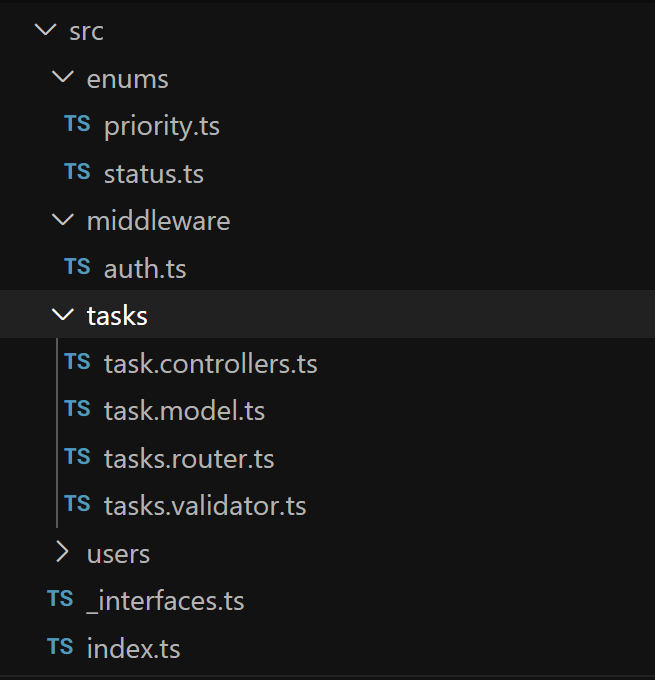
The above file structure should be familiar to you if you’ve used Express before. The index.ts file is the entry point of our server. We have the same Model View Controller architecture along with an auth middleware for protected routes. We are using Typescript (obviously 🤷♂️) so we have defined some files for the reusability of our interfaces and enums. One additional advantage with Hono is that it comes with Typescript by default. In Express you have to configure it yourself.
Hono can be configured with multiple deployment/server options, I’m currently using the in this demo but you can use whichever deployment option fits your needs.
2. Router
One notable difference is that Hono doesn’t allow abstracting away the callback function of a route in a separate controller file. But fear not! As your codebase grows, you can always create utility functions to encapsulate specific business logic.
Now, let’s compare how we’d fetch a list of tasks for a user using Express and Hono.
The below code is in our tasks.router.ts file
import { Router } from 'express';
import { taskController } from './task.controllers';
import { protect } from '../middleware/auth';

/*Fire the router function*/
export const tasksRouter: Router = Router();

// Create a get route.
tasksRouter.get('/tasks', protect, taskController.getAll);
The actual business logic will be written in a separate controller file tasks.controller.ts
const getAll = async (
 req: MyRequest,
 res: Response,
): Promise<Response> => {
 if (!req.user)
 return res.status(404).json({ errors: 'Not Authorized' })

 try {
 const tasks = await Task.find({ user: req.user.id })
 return res.status(200).json(tasks)
 } catch (error) {
 return res
 .status(500)
 .json({ errors: 'Internal Server Error' });
 }
};

export const taskController = {
 getAll
};
Hono is much more like the API endpoints of NextJS Instead of abstracting the business logic into a new controller file, the Hono docs recommend that we write all the code related to a particular route right there in the tasks.router.ts file so that Typescript can properly infer the types.
const router = new Hono()

router.get("/", protect, async (c) => {
 const user = c.get("user");
 if (!user) {
 return c.json({ error: "Not Authorized" }, 401);
 }

 try {
 const tasks = await Task.find({ user: user.id });
 return c.json(tasks, 200);
 } catch (error) {
 return c.json({ error: "Internal Server Error" }, 500);
 }
});
In the above code Snippet, the router works similarly to express where you import your Router in your index.ts file const app = new Hono() and app.route("/api/tasks", tasks);. you also receive a context object in the callback function, which lets you access the request headers, query params, form data, JSON body etc. and also lets you return JSON, Plain Text, HTML and even JSX as a response. It’s pretty neat.
3. Lightweight yet Batteries Included
If you’ve used Express before, you have to set up middleware for even the basic stuff required for a good server. This can be a good thing for experienced devs as it gives them more control to pick or not to pick a certain package but can be confusing for beginners.
You have to install separate packages for setting up cors, form submissions, file uploads, secure headers, JSON web tokens, session cookies etc.
While Hono has everything a good backend framework needs, it has built-in middleware for everything above.
Let’s take a look at the index.ts files in both scenarios
Express
import express, { Express} from 'express';
import cors from 'cors';
import dotenv from 'dotenv';
import helmet from "helmet";
import morgan from "morgan";

import connectToDB from "./utils/db";
import users from "./routes/users";
import tasks from "./routes/tasks";

// Instantiate express app
const app: Express = express();
dotenv.config();

// Parse request Body
app.use(express.json());
app.use(express.urlencoded({extended : false}))

// Use CORS for restricting requests from unsafe origins
app.use(cors());
// Use Helmet for adding security headers
app.use(helmet())
// use Morgan for logging requests
app.use(morgan('tiny'))

app.use('/api/auth', users);
app.use('/api', tasks);

const port = process.env.PORT || 3200;

app.listen(port, async () => {
 try {
 connectToDB()
 console.log(`MongoDB Connected http://localhost:${port}`);
 }
 catch (err) {
 console.error('Error during initialization', err);
 process.exit(1);
 }
})
Hono
import { serve } from "@hono/node-server";
import { cors } from "hono/cors";
import { prettyJSON } from "hono/pretty-json";
import { logger } from "hono/logger";
import { Hono } from "hono";
import { secureHeaders } from "hono/secure-headers";
import { config } from "dotenv";
import connectToDB from "./utils/db";
config();

import users from "./routes/users";
import tasks from "./routes/tasks";

const app = new Hono();

app.use("*", logger());
app.use("*", prettyJSON());
app.use("/api/*", cors();
app.use("/api/*", cors());
app.use("*", secureHeaders());
app.notFound((c) =>
 c.json({ message: "No Route Found for this Endpoint", ok: false }, 404)
);

app.route("/api/users", users);
app.route("/api/tasks", tasks);

serve(app, async (c) => {
 try {
 await connectToDB();
 console.log(`server running on http://localhost:${c.port}`);
 app.get("/", (c) => {
 return c.html("<h1>Hey There!, Welcome to task managers app</h1>");
 });
 } catch (err) {
 console.error("Error during initialization", err);
 process.exit(1);
 }
});
As you can see, Hono takes care of everything from having a built-in logger, handling cors and adding security headers while in Express you have to install separate packages like morgan, cors, helmet to achieve the same functionality.
Now I know that these are not large packages and don’t affect the bundle size but if I was a beginner developer and a framework took care of these small yet important things without me having to figure it out on my own, I’ll be more productive doing the actual coding.
4. Validations and Middleware
Hono is also better at handling server-side request validations
In Express, we usually define the validation schema in a separate .validator.ts file with the express-validator package and return a custom message in response to our .controller.ts if the body doesn’t pass our validation schema.
// tasks.validator.ts

import { body } from "express-validator";
import { ValidationChain } from "express-validator/src/chain";
import { Priority } from "../enums/priority";
import { Status } from "../enums/status";

export const createValidator : ValidationChain[] = [
 body('title')
 .not()
 .isEmpty()
 .withMessage('The task title is mandatory')
 .trim()
 .isString()
 .withMessage('Title needs to be in a text format'),
 body('date')
 .not()
 .isEmpty()
 .withMessage('Task date is mandatory')
 .isString()
 .withMessage('Date needs to be a valid date format'),
 body('description')
 .trim()
 .isString()
 .withMessage('Description needs to be in text format'),
 body('priority')
 .trim()
 .isIn([Priority.high, Priority.low, Priority.normal])
 .withMessage('Priority can only be normal,high or Low'),
 body('status')
 .trim()
 .isIn([Status.completed, Status.inProgress, Status.todo])
 .withMessage('Status can only be in progress, completed or Todo'),
]
// tasks.controller.ts
import { Response } from 'express';
import { validationResult } from 'express-validator';
import { Task } from './task.model';
import { MyRequest, ITask } from '../_interfaces';
import { Status } from '../enums/status';

const create = async (
 req: MyRequest,
 res: Response,
): Promise<Response> => {
 const errors = validationResult(req);

 if (!errors.isEmpty()) {
 return res.status(400).json({ errors: errors.array() });
 }
 // ...rest of the code
};
In our Hono app, we use zod to handle validations, you can use any other package but I prefer Zod because I love it it integrates very nicely with the @hono/zod-validator package of Hono.
In Hono, we don’t need to manually send the response, you only need to add the validation middleware and when you’re done, hono will automatically handle the rest. Isn’t it cool!
// tasks.validator.ts
import { z } from 'zod';
import { Priority } from "../enums/priority";
import { Status } from "../enums/status";

export const createTaskValidator = z.object({
 title: z.string().min(1, 'The task title is mandatory'),
 date: z.string().min(1, 'Task date is mandatory'),
 description: z.string().max(400, "The task description cannot be more than 400 characters"),
 priority: z.enum([Priority.high, Priority.low, Priority.normal]),
 status: z.enum([Status.completed, Status.inProgress, Status.todo]),
});
// tasks.router.ts
import { Hono } from "hono";
import { zValidator } from "@hono/zod-validator";
import {
 createTaskValidator,
} from "../../validators/task";
import { Task } from "../../models/task.model";

router.post(
 "/",
 zValidator("form", createTaskValidator),
 async (c) => {
 const body = c.req.valid("form");
 const user = c.get("user");
 // ...rest of the code
 }
);
Middleware
Hono has built-in middleware for handling both cookie or jwt-based authentication. We used the JWT implementation in our app below but you can also check out in Hpno
In Hono, you can just import the JWT package and sign and verify the JWT token very easily without relying on any third party libraries.
In the code below, we are signing the token with the user._id property.
// users.router.ts
import { sign } from "hono/jwt";

router.post("/login", zValidator("json", loginValidator), async (c) => {
 const body = c.req.valid("json");
 const { email, password } = body;

 const user = await User.findOne({ email: email });
 await sign({ user._id.toString() }, process.env.JWT_SECRET as string);
 // ...rest of the code
});
Then in our middleware function, we can verify the token and if it’s valid, we set the user on the context object of the hono router and access the user object in any of our routes if we are authenticated.
// middleware/auth.ts

import type { Context, Next } from "hono";
import { verify } from "hono/jwt";
import { User } from "../models/user.model";

export const protect =
 async (
 c : Context,
 next : Next,
 ) => {
 let token: string | undefined;
 const header = c.req?.header("Authorization")
 if (
 header && header.startsWith('Bearer')
 ) {
 // get token from header
 token = header.split(' ')[1]

 // check if token exists
 if (!token || token.length < 500) {
 c.json('Not Authorized, No Token Available',401)
 }
 // verify token
 const decoded = await verify(
 token,
 process.env.JWT_SECRET as string,
 )

 // Get the user ID from the token payload
 let user = await User.findById(decoded?.id).select(
 '-password',
 );

 if (!user) {
 return c.json('No user Found',404);
 }

 if (user) c.set("user", user)
 next()
 }
 //...error handling
 }
// tasks.router.ts
import { IUser } from "../../models/user.model";

type Variables = {
 user: IUser
}
// this step satisfies typescript and gives us intellisense throughout our code
// if we try to acces user object properties that we set in our protect middleware
const router = new Hono<{ Variables: Variables }>()

router.get("/", protect, async (c) => {
 const user = c.get("user");
 if (!user) {
 return c.json({ error: "Not Authorized" }, 401);
 }
}
The protect middleware is largely similar to middleware in an Express app. In Express, when we extract the token from the request headers, we validate it using the jwt.verify() method and assign our user object to res.locals.user. Later in our controllers, we access it similarly.
Production Ready?
After evaluating both apps based on the criteria discussed in , I believe we can confidently tick off all the items below:
- Excellent Developer Experience (especially with TypeScript 😍)
- Exceptionally performant Router (faster than Express)
- Significantly smaller bundle size (thanks to the built-in middleware)
- Extremely flexible (deployable on any runtime)
Sure, that’s impressive, but can it handle a large scale production app?
Well, that’s entirely up to you. It can perform every function that Express does, strictly adheres to modern web standards, supports all major runtimes, and is extremely potent for handling concurrent requests. So, why not give it a shot?
If you’re considering migrating your Express app to Hono, I assure you it won’t cause much trouble.
I strongly recommend giving this a try.
Until Next Time,
Happy Debugging Coding👋